






NewTrend · Bluetooth timer switch
Product overview
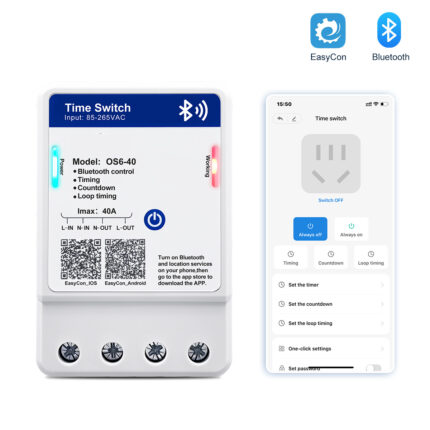
The OS6-B Bluetooth timer switch controls a circuit through the EasyCon app. It combines scheduled switching, a countdown and repeating loop timing, with up to 28 timing settings. Its 85–265V AC supply range covers 110V and 220V systems.

Technical specifications
| Model | OS6-B |
|---|---|
| Supply voltage | 85–265V AC |
| Rated current | 10A / 30A |
| Control | Bluetooth via EasyCon app |
| Timing capacity | Up to 28 settings |
| Operating functions | ON/OFF control; scheduled switching; countdown; loop timing |
| Additional controls | Always ON/OFF; password protection |
| Mounting | Wall mounting |
| Dimensions | 105 × 56 × 34mm (H × W × D) |

Scheduled ON/OFF control
Set switching times in the app to follow a daily equipment schedule. Multiple time settings support automatic ON/OFF control without repeatedly operating the front button.

Countdown switching
Set a countdown for the connected circuit. The countdown illustration shows automatic power OFF when the selected time expires.

Repeating loop timing
Use loop timing when equipment needs to cycle repeatedly. Set the timing in EasyCon to suit the required repeating operation.

Password protection
The app includes password protection for device settings to help prevent unauthorized changes.

Terminals and wiring
Identify the supply and load terminals before connection. Follow the L input, N input, N output and L output markings in the wiring illustration.

Dimensions and mounting
Mounting: Wall mounting. Use the dimensioned outline below to check the available installation space.

EasyCon connection
- Scan the app QR code to download EasyCon. Enable Bluetooth and location services as shown in the supplied setup guide.
- Open EasyCon and select “Search Devices”.
- Select “Connect” for the newly found device.
- After connection, use the ON/OFF, timer, countdown and loop timing controls.