




NewTrend · panel-mounted electrical measurement
Product overview
The PZEM-031 displays DC voltage, current, power and accumulated energy together. The 20A version connects directly into the measured current path using the four rear terminals. Its operating and measuring voltage is DC6.5–100V, with a switchable blue backlight and saved energy total.
Technical selection summary
| Model | PZEM-031 |
|---|---|
| Measured quantities | DC voltage, current, power and energy |
| Operating / measuring voltage | DC 6.5–100 V |
| Current measurement | 0–20 A, direct input; no external shunt |
| Power range | 0–2000 W within the voltage/current ratings |
| Energy range | 0–9999 kWh |
| Accuracy | Class 1.0 |
| Voltage alarm setting | Upper and lower thresholds, 6.5–99.9 V |
| Alarm indication | Flashing backlight and voltage display |
| Memory | Energy data and backlight state retained after power-off |
| Energy reset | Front-button CLr confirmation |
| Front dimensions | 89.6 × 49.6 mm |
| Body dimensions | 84.6 × 44.6 mm |
| Depth | 24.4 mm |
| Installation | Indoor panel mounting |
| Package | One four-function meter |
Direct 20A measurement and wiring
Connect DC IN and LOAD exactly as marked on the four-terminal rear diagram. Observe positive and negative polarity and isolate the circuit before wiring. This is the direct 20A version; it does not use the external 50A/75mV or 100A/75mV shunts of other meter variants.
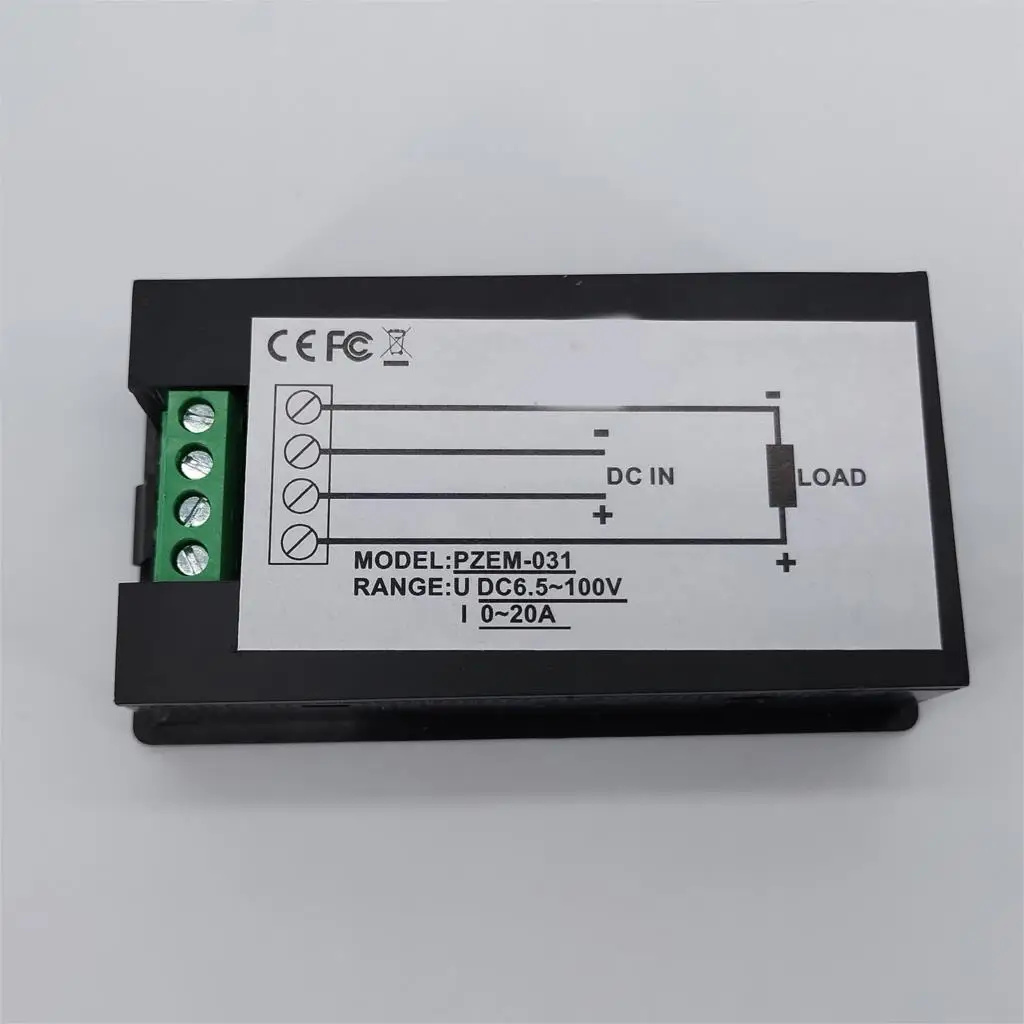
Keep the measured circuit within DC6.5–100V and 20A. The corresponding maximum power range is 2kW. Use the correct conductor rating and terminal connections for the load.
Display and saved energy
The LCD shows all four readings simultaneously. Below 1kW, power is displayed in the 0.0–999.9W format; from 1kW the display uses whole watts through 2000W. Energy is displayed in Wh below 10kWh and in kWh above that level, up to 9999kWh. Voltage uses the 6.50–99.99V format. Accumulated energy is stored when power is removed and resumes from the saved value.
Backlight and energy reset
Short-press the button to switch the backlight on or off; the backlight state is saved automatically. To clear energy, hold the button until CLr appears and release it. While the energy reading flashes, short-press again to confirm. If no key is pressed within five seconds, the meter exits without clearing the total.
Setting the voltage alarm
Hold the button until SET appears, then release it. The voltage field displays the upper alarm threshold and the current field displays the lower threshold. Short-press to increase the flashing digit. After more than three seconds without a press, the setting position advances through the six digits. Set thresholds within 6.5–99.9V. Hold the button until PASS appears to save and exit. An alarm is indicated by flashing voltage and backlight.
Dimensions and panel installation
The front flange measures 89.6×49.6mm; the body is 84.6×44.6mm and the depth is 24.4mm. Install in an indoor panel, leaving access to the rear terminals. Avoid outdoor exposure and do not exceed the rated voltage or current.

Typical applications
- Low-voltage DC equipment and battery-circuit monitoring.
- Bench-supply and DC load indication.
- Local power and accumulated energy measurement up to the rated 20A input.